
If you are still managing your projects with a combination of Excel sheets, text messages, and a prayer, you aren’t just losing time—you’re losing profit.
As a contractor, your expertise is in the build, not in digital data entry. But in 2026, the difference between a high-margin project and a “break-even” nightmare is often the software you use to manage your communication, change orders, and time logs.
There are a lot of construction management software options out there. Tools like Procore, CoConstruct, Houzz Pro, Jobber, and Fieldwire all have their strengths.
But in this article, I’m focusing on Contractor Foreman, Buildern, and Buildertrend because they are the three platforms most small and mid-sized contractors usually compare.
Each one is built differently when it comes to pricing, ease of use, and features, so comparing them side-by-side gives a much clearer picture of which one is actually worth your money.
Instead of listing 20 different tools with short reviews, I wanted to spend more time breaking down the software most contractors are seriously thinking about using.
Table of Contents
The Comparison Matrix
Before we dive into the details, here is the high-level breakdown of how these three heavy hitters stack up across the features that matter most to your bottom line.
| Feature | Contractor Foreman | Buildern | Buildertrend |
| Best For | Small to Mid-Sized Crews | Modern, Design-Forward Firms | Large-Scale Enterprise/Custom |
| Starting Price | $49 – $322/mo | $250 – $400/mo | ~$800/mo (Premium) |
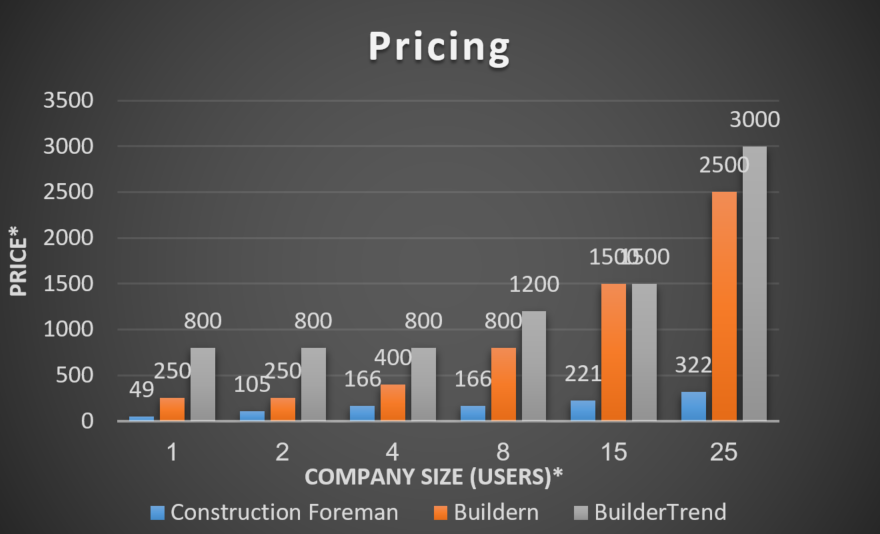 *the prices for “BuilderTrend” are estimated as they stop publishing online *the way user count can vary between software | |||
| Onboarding | Unlimited Free Training | Fast, Intuitive | Structured/Paid |
| Mobile GPS | Best-in-Class (Field Focused) | Standard | Advanced |
| Design/UI | Utilitarian/Functional | Sleek & Modern | Corporate/Enterprise |
Not sure which platform fits your business?

Contractor Foreman: The Value Champion

Contractor Foreman Review & Deep Dive
If you are a smaller shop or a trade contractor looking to digitize without breaking your bank account, Contractor Foreman is your absolute baseline benchmark for software evaluations in 2026. It balances extreme budget flexibility with features that field workers will actually use on-site.
- Ideal Company Size: Built explicitly for small to mid-sized crews (1 to 50 workers), specialty trade subcontractors, and growing residential general contractors who want premium capabilities without the enterprise price tag.
- Pricing Structures: Pricing tiers scale from $49 to $332 per month billed annually. Unlike competitors that charge punitive per-user or per-project fees, Contractor Foreman allows you to keep your costs fixed, ensuring your tech overhead doesn’t inflate as your team grows.
- Onboarding Experience: This platform provides unlimited free live training for your entire team across every tier. For teams that aren’t naturally tech-savvy, this interactive, human-led support reduces administrative friction during rollout.
- Mobile App & Field Execution: The mobile experience offers strong GPS time-clocking and real-time punch lists. Crews can log hours, check in with geofenced location validation, and snap site photos directly within the app, feeding live data to your main dashboard.
- Scheduling & Gantt Engine: Scheduling utilizes a clear drag-and-drop system. You can easily map dependencies, toggle across Gantt or calendar views, and push automated schedule updates directly to your sub-contractors and crews via SMS or app notifications.
- Reporting Capabilities: Reporting is clean and highly functional. While it skips over complicated corporate predictive forecasting, it provides excellent real-time daily project logs, equipment mileage records, and direct safety inspection tallies.
The Bottom Line: Contractor Foreman is the ultimate budget-friendly powerhouse for field-first crews. If you have fewer than 50 workers, want to track labor via precise mobile GPS, and need your team trained for free without software implementation fees, this is your best option.
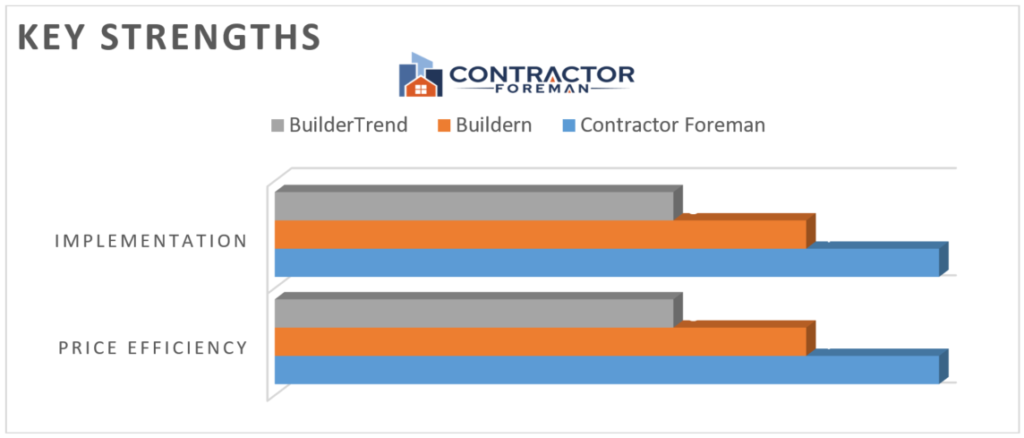
* One of Constractor Foreman‘s biggest strengths is its exceptional support and free training, which help ensure a smooth implementation process. Combined with one of the most affordable pricing models in the industry, it delivers outstanding value for contractors.
Ready to Try Contractor Foreman?
If affordability and ease of adoption are your top priorities, Contractor Foreman offers one of the strongest feature-to-price ratios available.
👉 [Start a Free Trial of Contractor Foreman]

The Modern Financial Powerhouse
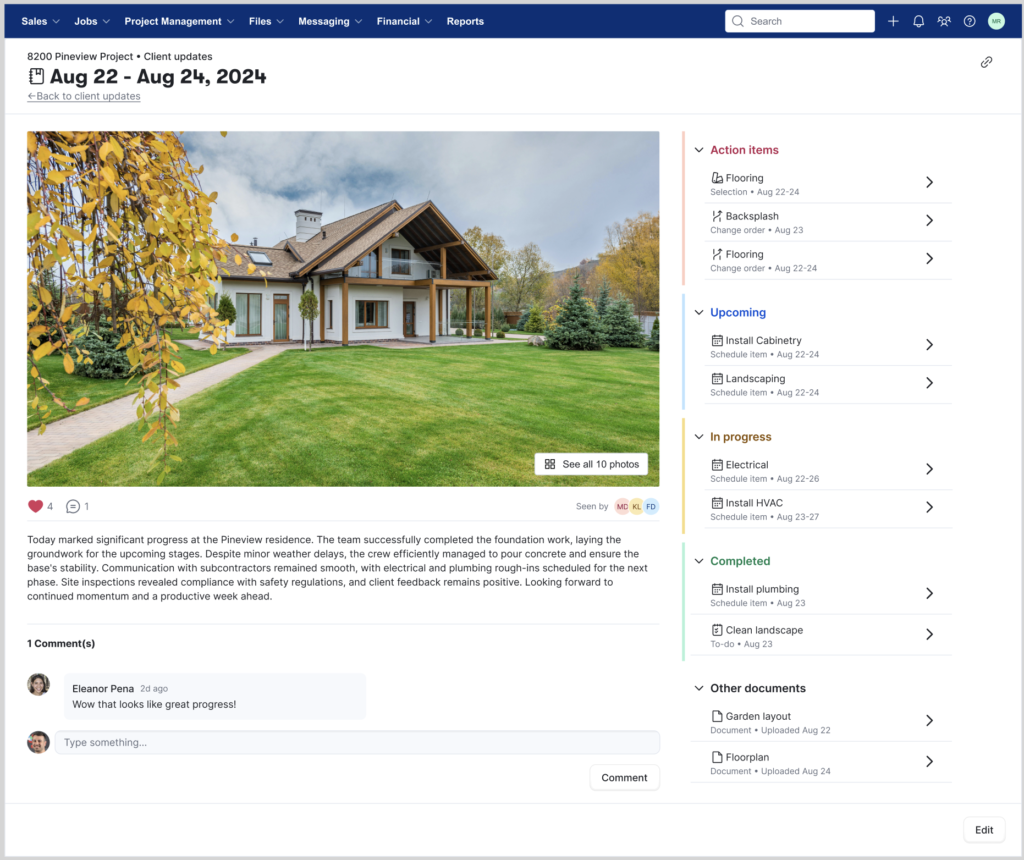
Buildern Review & Deep Dive
Buildern is designed for the modern contractor who recognizes that corporate branding and financial transparency are critical tools for winning bids. It treats aesthetic design and backend financial tracking as interconnected components of a successful construction business.
- Ideal Company Size: Optimized for custom home builders, design-build firms, and mid-market remodeling teams who deal directly with highly selective, premium residential clients.
- Pricing Structures: Paid plans start at $250 per month for the Starter tier (which includes 2 administrative user seats) and scale up to $400 per month for the Professional tier (including 4 seats). Additional back-office seats cost roughly $90 to $100 per month, while field workers, subs, and clients access the platform completely free.
- Onboarding Experience: Onboarding is fast and intuitive due to its clean UI layout. Most operations teams can fully migrate active projects, cost catalogs, and contact lists within a few days using their automated cloud importing tools.
- Mobile App & Field Execution: The field app balances clarity with utility. It allows project managers to submit daily logs, file structural photo updates, and review client selections on-site without navigating a maze of menus.
- Scheduling & Takeoff Mechanics: Buildern integrates advanced digital plan takeoffs directly into its broader estimating engine. You can execute onscreen measurements on blueprints, populate quantities, and map those items directly onto a master schedule timeline.
- Reporting & Financial Logic: The core asset here is real-time Material Purchase Order (PO) tracking. When field expenses or material orders are submitted, they tie directly back to your cost codes and budget estimates, protecting your profit margins from unexpected cost overruns.
The Bottom Line: Buildern is the clear choice for client-facing design-build firms and premium custom remodelers. If you want pristine client presentations, digital on-screen blueprint takeoffs, and precise material purchase order matching to protect your margins, choose Buildern.
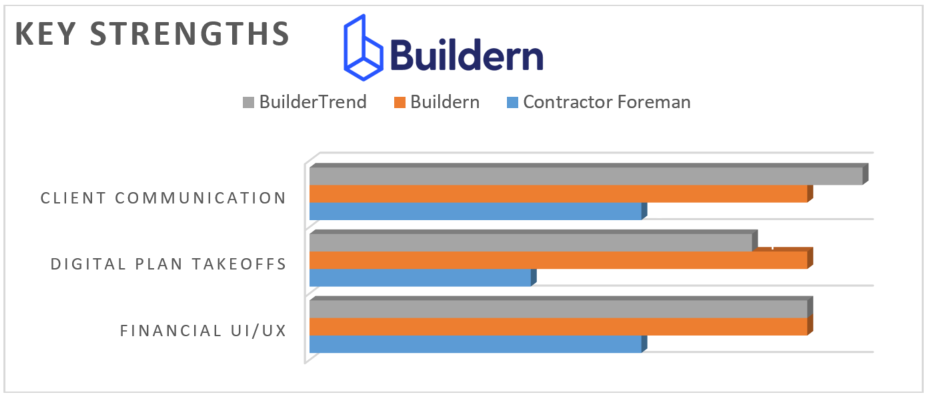
*Buildern stands out for its modern client communication tools, advanced digital takeoff capabilities, and intuitive financial management experience, making it a strong choice for contractors seeking greater operational efficiency.
Want Better Client Proposals?
Buildern is built for contractors who want a modern client experience and tighter control over project finances.
👉 [Book a Buildern Demo]

The Industry Standard
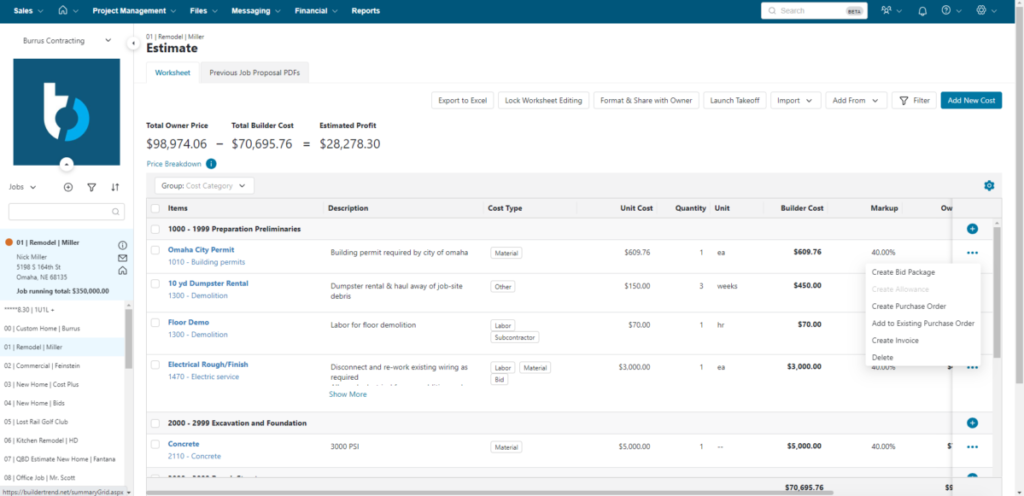
Bildertrend Review & Deep Dive
Buildertrend is an established system for massive production tracking. If you are managing multiple active custom developments, running an enterprise-scale operation, and requiring an absolute single source of truth, this system delivers the deep infrastructure necessary to run your business.
- Ideal Company Size: Built for high-volume custom residential home builders, large commercial operations, and multi-location general contracting firms managing complex projects simultaneously.
- Pricing Structures: Buildertrend targets the enterprise tier, with premium implementations regularly starting around $800 per month. They do not publish all pricing plans transparently online, requiring structured consultations, but their model focuses heavily on scalable long-term annual contract commitments.
- Onboarding Experience: Due to its massive suite of tools, implementation requires a structured, multi-week training path. It represents a significant procedural shift for an office, making its implementation phase look more like a corporate deployment than a simple software installation.
- Mobile App & Field Execution: The app serves as a robust mobile command center. It gives site supervisors total visibility into cross-project task lists, detailed sub-contractor scheduling matrices, and deep documentation storage out in the field.
- Scheduling & Scale Architecture: This platform offers advanced scheduling control. You can manage complex logic strings, handle multi-tiered subcontractor coordination, track warranty management cycles, and manage cross-project resources from a single window.
- Reporting & AI Automation: Its standout features include automated, AI-assisted daily logs. The platform can pull field photos, check-in data, and weather metrics together to auto-generate daily reports, while its advanced “Selections Engine” provides clear tracking for fixture selections on luxury home builds.
The Bottom Line: Buildertrend remains the undisputed industry standard for massive enterprise control. If you are a high-volume builder managing 10+ custom job sites simultaneously and require automated AI site logging alongside a deep material selections engine, the investment is well worth it.
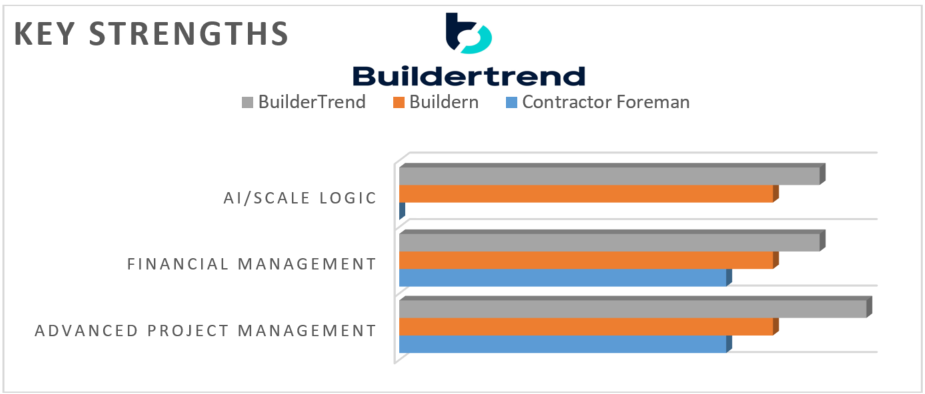
*Buildertrend’s strengths in scalability, financial management, and advanced project control position it among the top construction software platforms, often compared to enterprise solutions
Need Enterprise-Level Project Control?
Buildertrend is designed for larger construction companies managing multiple active projects simultaneously.
👉 [See Buildertrend Pricing]
Final Verdict: Which should you choose?
This chart highlights the Competitive Advantage—where each software is objectively stronger than the others.
| Indicator | Contractor Foreman | Buildern | Buildertrend |
| Budget Efficiency | ✅ Winner (Unbeatable) | Moderate | High Cost |
| Implementation | ✅ Winner (Live Training) | Fast | Complex |
| Financial UI/UX | Standard | ✅ Winner (Modern) | Corporate |
| Client Interaction | Basic | Advanced | ✅ Winner (Deep Engine) |
| AI/Scale Logic | Basic | Advanced | ✅ Winner (AI Automation) |
| Digital Plan Takeoffs | No | ✅ Advanced | ✅ Advanced |
Contractor Foreman vs Buildern vs Buildertrend (winner Table)
| Category | Winner 🏆 |
| Best Value | Contractor Foreman |
| Best UI | Buildern |
| Best Enterprise Features | Buildertrend |
| Fastest Implementation | Contractor Foreman |
| Best Client Experience | Buildern |
| Best for Large Companies | Buildertrend |
Choose Contractor Foreman if:
- You want maximum value
- You have under 50 employees
- You need GPS tracking
- You want free onboarding
👉 [Try Contractor Foreman]
Choose Buildern if:
- Client experience matters
- You want cleaner financial tracking
- You need digital takeoffs
👉 [Book a Buildern Demo]
Choose Buildertrend if:
- You manage multiple projects simultaneously
- You need enterprise workflows
- You have a larger budget
👉 [See Buildertrend Pricing]
The Conclusion: “Which One Should You Start With?”
Choosing the right management software isn’t about picking the ‘best’ one on paper—it’s about picking the one that your team will actually use without complaining.
Most of these tools do similar things—the real difference is which one matches your company size and workflow.
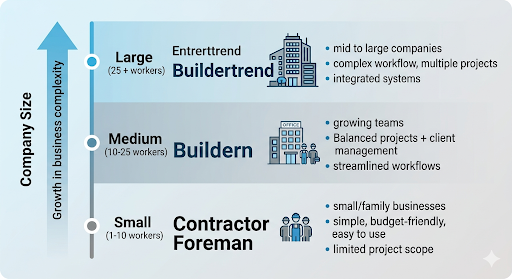
Consider this:
- If you are price-conscious and want the easiest learning curve: Start with [Contractor Foreman]. The value is simply too good to ignore for most growing businesses.
- If you want to win more bids with better presentations: [Buildern] is the choice. Its proposal tools and financial visibility are built for modern, profit-focused owners.
- If you are running a high-stakes, large-scale operation: [Buildertrend] has the deep infrastructure and AI tools to manage a massive workload where financial precision is non-negotiable.
Before You Buy: Download the Transition Safety Net
Moving your entire business from spreadsheets and notebooks into a new software can feel like jumping out of an airplane. If your team resist the change, you wasted thousands of dollars.
To make sure your software implementation actually succeeds on day one, grab our free Construction Tech Migration Playbook.
Inside this free toolkit, you’ll get:
- The spreadsheet-to-cloud Migration Map: Exactly which columns to clean up before importing data so your files don’t crash.
- The 30-Day Tech Adoption Template: A step-by-step rollout plan to get your filed crews using the app daily without complaining.
- The Annual Site Leak Audit: A checklist to trace where your cash is leaking right now so you can track it in your new dashboard instantly.
<<<[Click here to download the Construction Tech Migration Playbook for Free]>>>> Drop your email and we’ll send the PDF template directly to your inbox
Contractor Foreman
Best For: Small & Mid-Sized Contractors
Buildern
Best For: Custom Home Builders
Buildertrend
Best For: Large Construction Firms
*Disclaimer: This post contains affiliate links. If you purchase through them, I may earn a commission at no extra cost to you. My reviews are based on independent research into how these tools impact day-to-day operations for contractors.
Stop letting paperwork dictate your schedule. Choose the tool that solves your current biggest bottleneck and get back to doing what you do best—building.