
For decades, the construction industry has relied on the “clipboard standard.” It’s familiar, it feels tactile, and for many, it’s the way it’s always been done. But in 2026, paper-based construction workflows are no longer efficient. Modern construction project management software and contractor management software platforms have become essential for contractors that want to scale operations, improve scheduling, and protect profit margins.
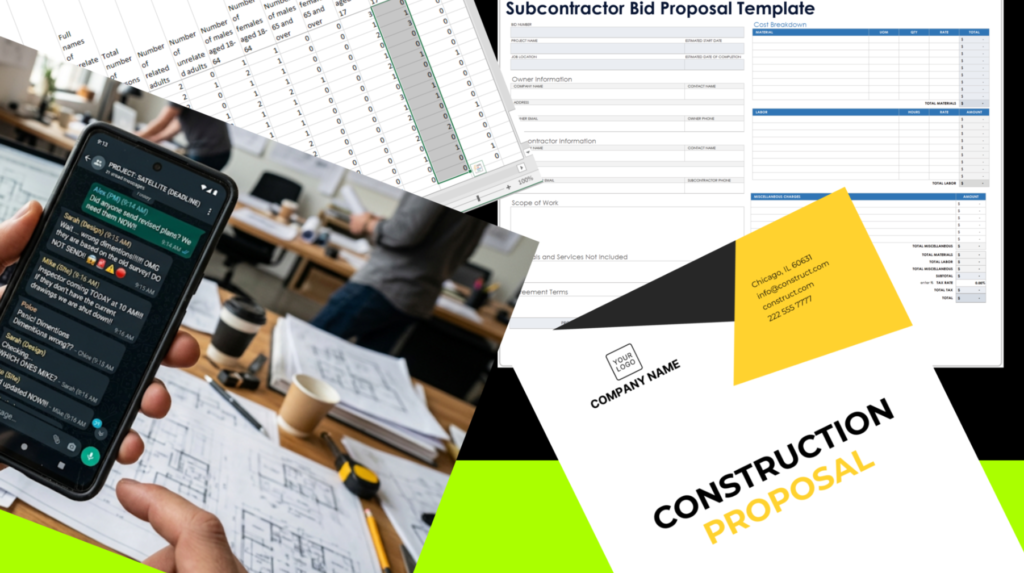
Table of Contents
- The “Silent Tax”: Why Manual Processes Are Killing Your Margins.
- Common Signs Your Construction Business Has Outgrown Paper Systems.
- The Strategy: A Three-Phase Implementation.
- Visualizing the ROI: Data-Driven Performance.
- The “Pivot”: Choosing Your Foundation.
- The Final Verdict.
The Paper Trap:
How paperwork steals productive construction hours every week.
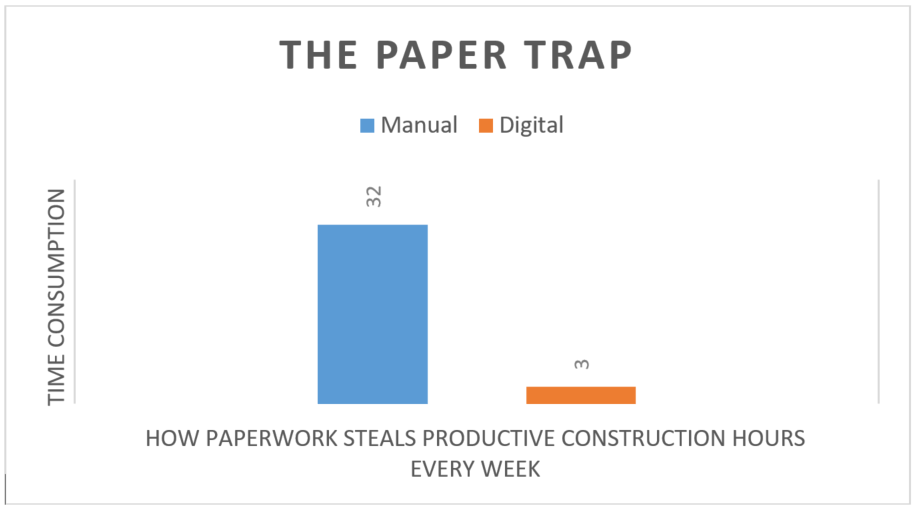
*The chart shows how much time is spent on paperwork compared to digital workflows for the same work.
If you are currently managing your operations through a mix of paper daily logs, text-message change orders, and manual invoice entry, you aren’t just working harder; you are creating hidden operational costs that slowly destroy project profitability.
This guide explains how contractors can transition from paper-based workflows to digital construction management software without disrupting active projects or field operations.
The “Silent Tax”: Why Manual Processes Are Killing Your Margins
Many contractors view software subscriptions as an “extra cost.” This is a fundamental misunderstanding of business overhead. Manual construction workflows create hidden operational costs that reduce profitability through wasted labor, delayed communication, duplicate purchases, and inaccurate job costing.
As projects become more complex, many contractors discover that spreadsheets and paper forms cannot provide the visibility offered by modern construction management software, contractor management software, and integrated construction scheduling software platforms.
- The Re-Keying Penalty: Every time a staff member re-keys a quote from a PDF or transcribes a site log from a notebook to a spreadsheet, you are paying for labor that produces zero value. Industry benchmarks often estimate manual invoice processing costs between $15 and $25 per invoice when labor, approvals, corrections, and administrative overhead are included.
- The “Double-Order” Trap: Without real-time visibility into purchase orders (POs), it is alarmingly easy to over-order materials or pay twice for the same delivery. Digital “three-way matching”—automatically comparing your PO, delivery notice, and invoice—is the only way to plug this leak.
- The Liability Gap: In construction, documentation is your only defense against disputes. A time-stamped digital report with photos, location data, and audit history generally provides stronger documentation than handwritten records during disputes.
Not sure which platform fits your business? Read our guide, The 2026 Construction Management Software Showdown, to compare Contractor Foreman, Buildern, and Buildertrend based on company size, project complexity, budget, and business requirements before making a decision.
Common Signs Your Construction Business Has Outgrown Paper Systems
Many contractors don’t realize how much time and money is lost through disconnected workflows until projects begin scaling. If your company is experiencing several of the problems below, it may be time to move to a digital construction management system.
- Change orders constantly get delayed or lost
- Field crews and office staff are working from different information
- Project documents are difficult to find quickly
- Material orders are duplicated or missing
- Scheduling updates are shared through phone calls or text messages
- Job costing becomes inaccurate as projects grow
- Labor hours are entered days after the work is completed, reducing job-cost accuracy
- Subcontractor communication is difficult to track
- Invoice approvals take days instead of minutes
- Team members waste time searching for paperwork
If these issues are becoming common in your business, construction management software can help centralize communication, automate workflows, and improve project visibility across every active job.
The Strategy: A Three-Phase Implementation
Do not attempt a “big bang” implementation. Construction is a high-stakes environment; the goal is operational continuity, not chaos.
Phase 1: Establish the “Single Source of Truth”
Your first step is to centralize your data. Stop using separate apps for messaging, scheduling, and document storage. Transition to a construction management platform like Contractor Foreman to house your project specs, daily logs, and sub-contractor communications in one searchable hub.
Why? When your field crew and office staff work from the same centralized system, communication errors and information gaps are significantly reduced.
Phase 2: Automate the Field-to-Office Bridge
Field crews don’t want to do “data entry.” They want to build. Construction workflow automation only works when the software makes the crew’s daily job easier instead of adding more admin work.
The Fix: Implement mobile-first daily logging. If your software allows a foreman to snap a photo, dictate a note, and GPS-tag their location in under two minutes, they will do it. If it requires a 20-minute form-filling session, they will skip it.
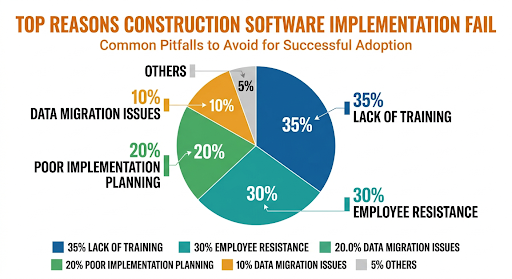
Overcoming Resistance to Digital Construction Software
One of the most common concerns contractors have during a digital transition is employee adoption. Field crews are often comfortable with established processes and may view new software as additional administrative work.
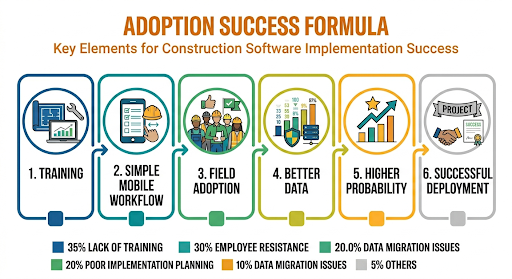
Successful implementations focus on simplifying existing tasks rather than introducing new ones. Mobile-friendly construction management apps allow foremen and crew leaders to submit daily logs, photos, time entries, and project updates directly from the jobsite using a smartphone or tablet.
The most successful companies start with a small group of users, provide basic training, and demonstrate how digital tools reduce paperwork rather than increase it. When employees see immediate benefits, adoption typically improves significantly.
Phase 3: The Financial Integration
Once your field data is flowing, connect your construction project management software to your accounting platform. Whether you use Buildern for its high-end financial oversight or Buildertrend for enterprise-level cost-coding, your goal is to automate the sync with QuickBooks or Xero.
The Result: By using real-time financial reporting and construction job costing software capabilities. You stop “managing” the office and start “analyzing” your business. You move from checking if you’re profitable to knowing why you are profitable.
Visualizing the ROI: Data-Driven Performance
To demonstrate this transition to your stakeholders or partners, use the following visual benchmarks.
Construction Workflow Automation vs. Manual Processes
| Process Metric | Manual (Paper/Spreadsheets) | Digital (Integrated System) |
|---|---|---|
| Change Order Approval | 3–5 Days (Courier/Email) | < 2 Hours (Mobile Approval) |
| Data Retrieval | 30+ Minutes (Filing/Searching) | < 1 Minute (Global Search) |
| Financial Accuracy | Higher Risk of Manual Errors | Automated Validation with Exception Review |
| Field-to-Office Sync | End-of-Week Batch | Real-Time/Live |
Construction workflow automation reduces repetitive administrative work and helps teams spend more time on project execution
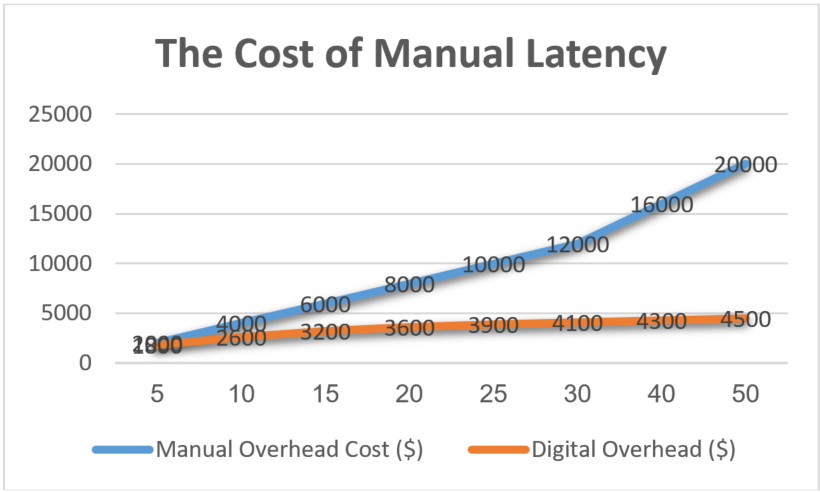
*This chart shows how manual construction workflows become increasingly expensive as project volume grows, while digital construction management software keeps overhead under control through automation, centralized communication, and streamlined operations.
Want to Reduce Admin Time?
Free Construction Digital Maturity Checklist to learn how contractors are reducing paperwork, improving scheduling, and transitioning to digital project management systems.
<<<<< link>>>>
Contractor Foreman
Best For: Small & Mid-Sized Contractors
Buildern
Best For: Custom Home Builders
Buildertrend
Best For: Large Construction Firms
The “Pivot”: Choosing Your Foundation
Transitioning to digital is about partnership. You need a platform that scales with your ambition.
- For the Growth-Focused Contractor: If you need a field-first system that gets your crew to actually use the mobile app, Contractor Foreman is the undisputed value leader. Its free, unlimited training is the single best way to ensure your team doesn’t “revolt” during the transition.
- For the Brand-Centric Firm: If you are losing bids because your proposals look “thin,” Buildern offers the modern financial presentation that wins high-end residential work.
- For the Enterprise Operator: If your scale demands deep AI-driven logistics and complex sub-contractor tiers, Buildertrend provides the professional infrastructure required to manage multi-million dollar flows.
Before selecting a platform, review our complete comparison guide that breaks down which construction management software works best for small contractors, growing companies, and large construction firms – Best Construction Management Software for Contractors (2026)
*Disclaimer: This post contains affiliate links. If you purchase through them, I may earn a commission at no extra cost to you. My reviews are based on independent research into how these tools impact day-to-day operations for contractors.
The Final Verdict
Construction companies that still rely on paper workflows in 2026 are losing time, money, and visibility on every project. The longer your business depends on spreadsheets, handwritten logs, and disconnected communication, the harder it becomes to scale profitably.
Modern construction project management software is no longer just a convenience—it is the operational foundation of a competitive construction business.
Whether you choose Contractor Foreman for affordability, Buildern for modern client-focused workflows, or Buildertrend for large-scale project management, the goal is the same: reduce admin work, improve job visibility, and protect your margins. The contractors who digitize now will spend less time chasing paperwork and more time growing revenue.
Find the best platform for your business: